

Authorization
Authorization refers to the process of granting a user or application access permissions to Spotify data and features (e.g your application needs permission from a user to access their playlists).
Spotify implements the OAuth 2.0 authorization framework:
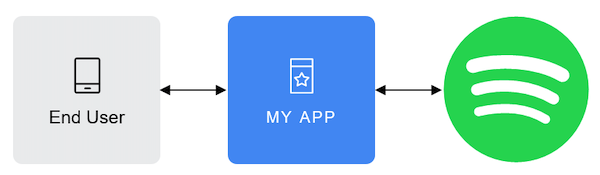
Where:
-
End User corresponds to the Spotify user. The End User grants access to the protected resources (e.g. playlists, personal information, etc.)
-
My App is the client that requests access to the protected resources (e.g. a mobile or web app).
-
Server which hosts the protected resources and provides authentication and authorization via OAuth 2.0.
The access to the protected resources is determined by one or several scopes. Scopes enable your application to access specific functionality (e.g. read a playlist, modify your library or just streaming) on behalf of a user. The set of scopes you set during the authorization, determines the access permissions that the user is asked to grant. You can find detailed information about scopes in the scopes documentation.
The authorization process requires valid client credentials: a client ID and a client secret. You can follow the Apps guide to learn how to generate them.
Once the authorization is granted, the authorization server issues an access token, which is used to make API calls on behalf the user or application.